| Disclaimer: Microsoft Active Directory Federation Services (ADFS) is a product offered by Microsoft Corporation. This document shows how to configure applications in ADFS for Windows 2016 using the tools provided by the vendor. What is shown here is valid at the time of writing and can be referred to as a guideline to understand how applications should be setup in ADFS. This can change over time. Please refer to the latest ADFS documentation for more up to date information. |
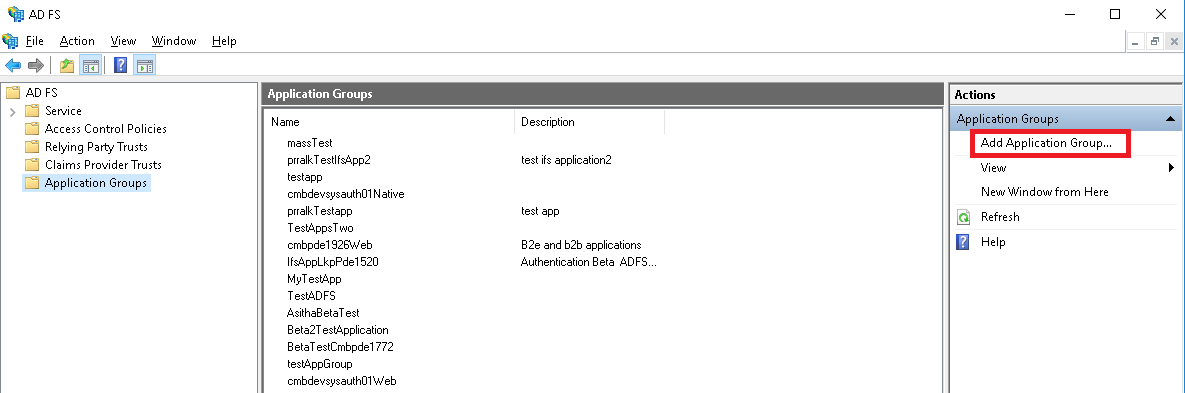
The applications that need to be authenticated using Active Directory Federation Services have to be registered and configured in ADFS for Windows 2016. This is performed using the tools provided by ADFS.
NOTE: How to configure the Active Directory user registry and how to enable and configure Active Directory Federation Services for the AD is outside the scope of this documentation.
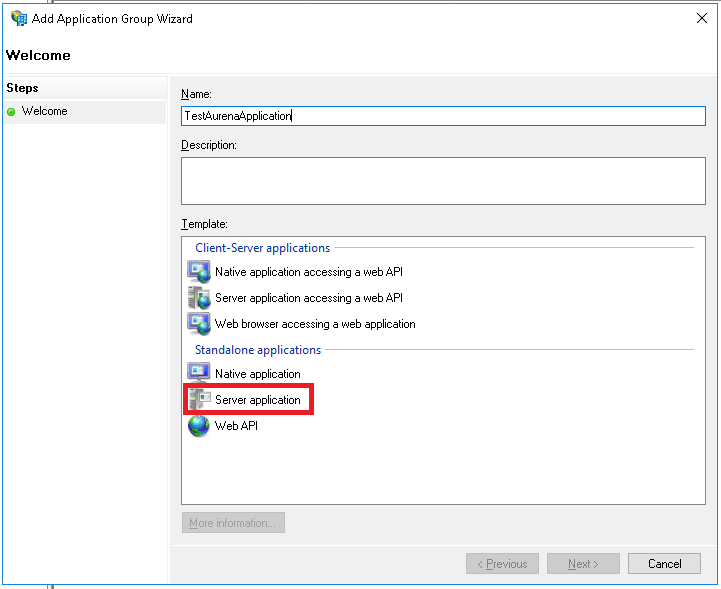
https://<fully_qualified_domain_name_of_the_app_server:port>main/ifsapplications/projection/oauth2/callback/
https://<fully_qualified_domain_name_of_the_app_server:port>/main/ifsapplications/web/oauth2/callback/
E:g:
https://lkppdeTest888.corpnet.ifsworld.com:58080/main/ifsapplications/projection/oauth2/callback/
https://lkppdeTest888.corpnet.ifsworld.com:58080/main/ifsapplications/web/oauth2/callback/
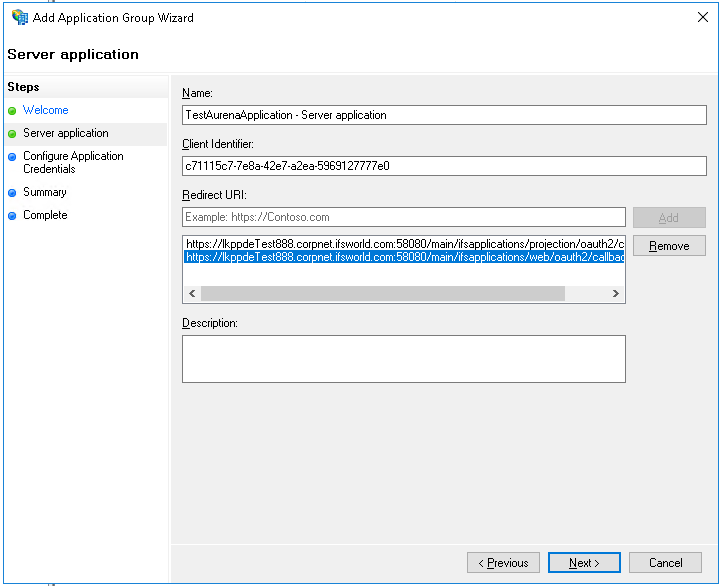
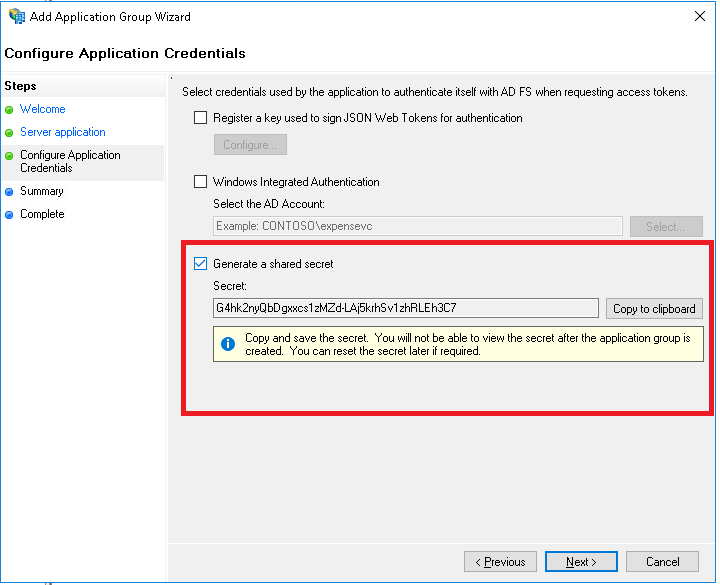
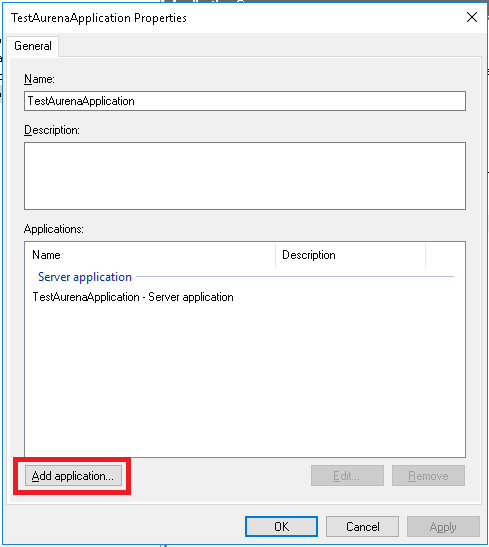
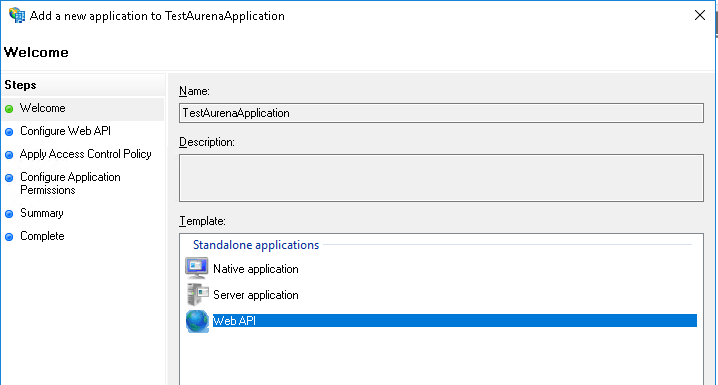
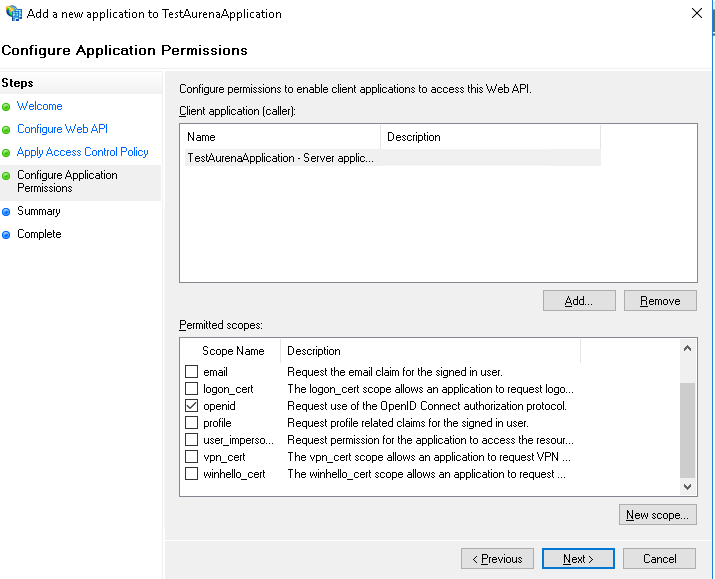
https//:<fully_qualified_domain_name_of_the_app_server:port>/b2b/ifsapplications/projection/oauth2/callback/
https://<fully_qualified_domain_name_of_the_app_server:port>/b2b/ifsapplications/web/oauth2/callback/
E.g:
https://lkppdeTest888.corpnet.ifsworld.com:58080/b2b/ifsapplications/projection/oauth2/callback/ https://lkppdeTest888.corpnet.ifsworld.com:58080/b2b/ifsapplications/web/oauth2/callback/
<https://fully_qualified_domain_name_of_the_app_server:port>/int/default/plsqlgateway/oauth2/callback/
<https://fully_qualified_domain_name_of_the_app_server:port>/int/default/clientgateway/oauth2/callback/
<https://fully_qualified_domain_name_of_the_app_server:port>/main/default/plsqlgateway/oauth2/callback/
<https://fully_qualified_domain_name_of_the_app_server:port>/main/default/clientgateway/oauth2/callback/
E:g:
https://lkppdeTest888.corpnet.ifsworld.com:58080/int/default/plsqlgateway/oauth2/callback/
https://lkppdeTest888.corpnet.ifsworld.com::58080/int/default/clientgateway/oauth2/callback/
https://lkppdeTest888.corpnet.ifsworld.com::58080/main/default/plsqlgateway/oauth2/callback/
https://lkppdeTest888.corpnet.ifsworld.com:58080/main/default/clientgateway/oauth2/callback/
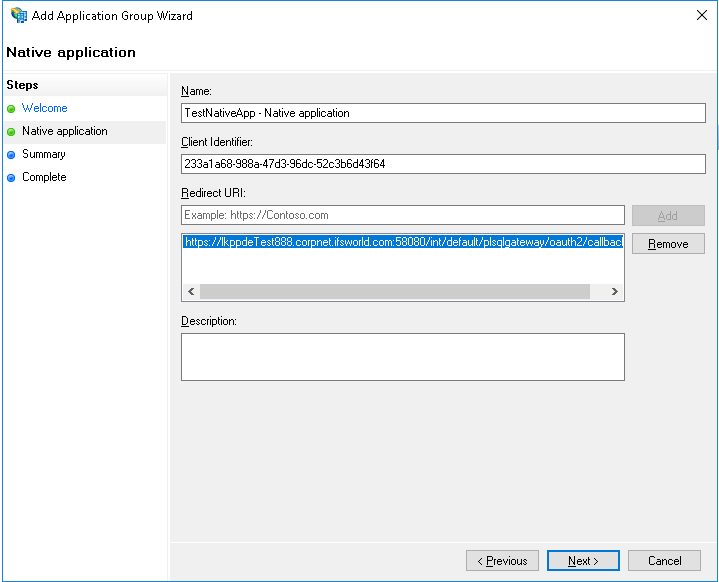
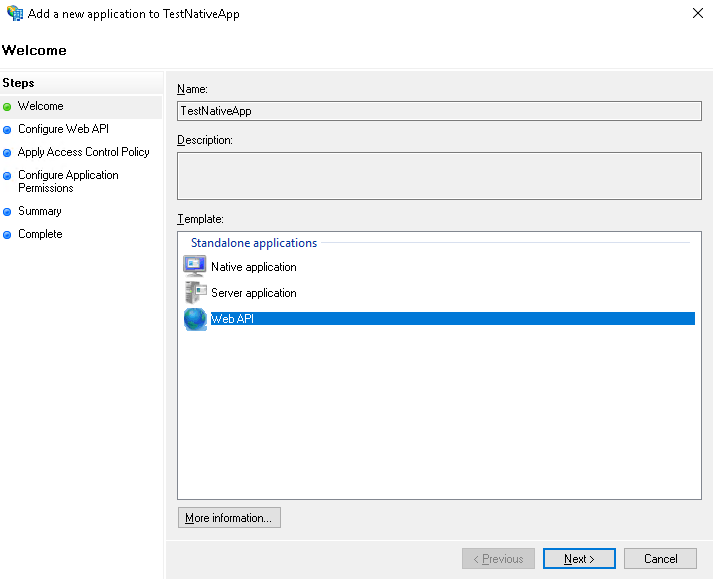
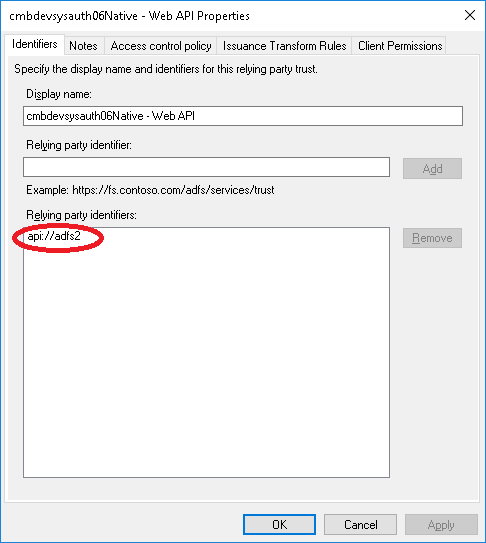
E.g: api://PROD_INSTANCE
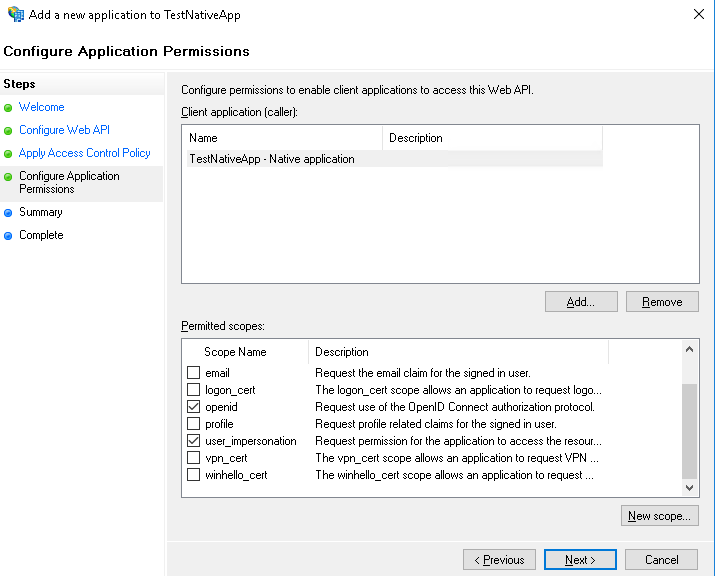
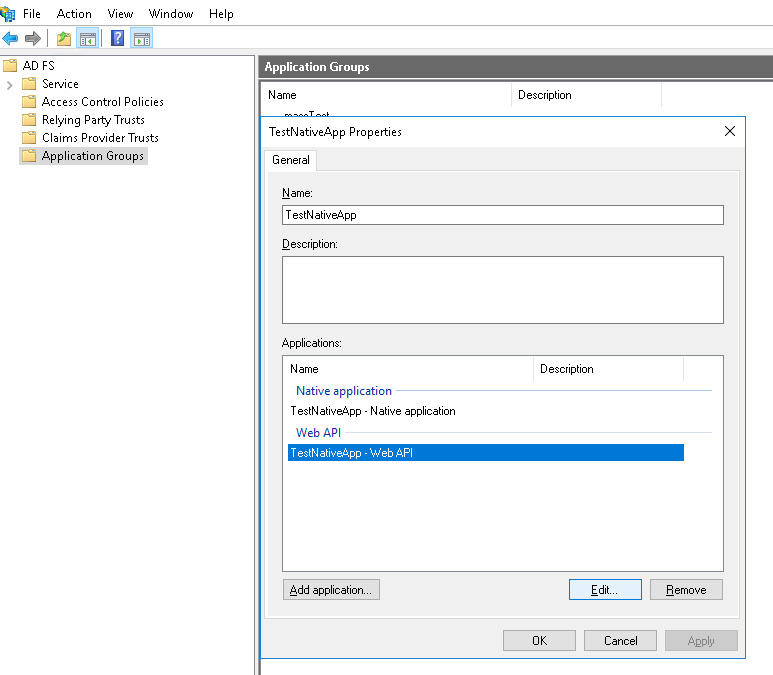
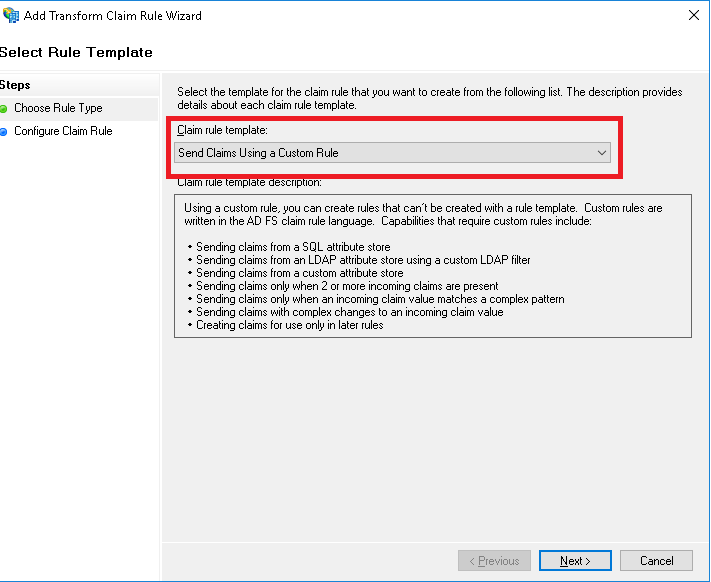
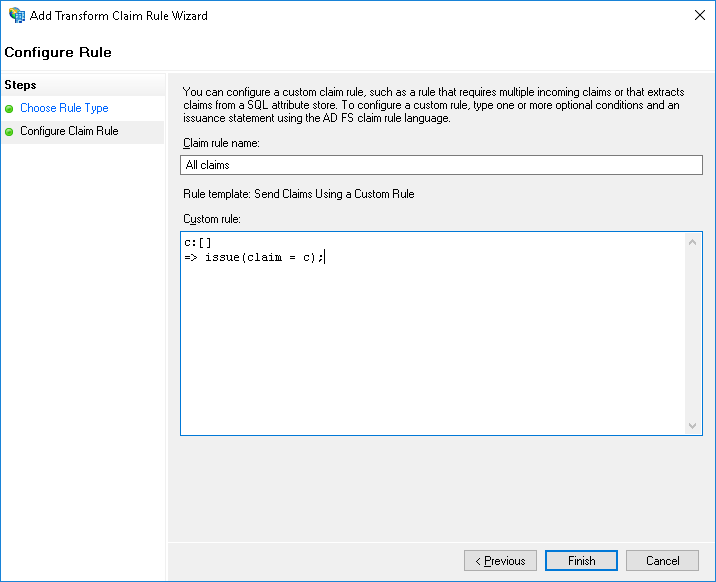
| Claim rule name | Custom rule |
|---|---|
| All claims | c:[] => issue(claim = c); |
| Issue open id scope | => issue(Type = "http://schemas.microsoft.com/identity/claims/scope", Value = "openid"); |
| Issue user_impersonation scope |
=> issue(Type = "http://schemas.microsoft.com/identity/claims/scope", Value = "user_impersonation"); |
NOTE: Re-authenitcation behavior: When the user logs in and work in IFS Enterprise Explorer client the client session is refreshed based on the session timeout (Default 10 minutes). When the current session times out the Access Token given by the ADFS server is used to refresh the client session. The Access Token is has a lifetime of about 1 hour by default. Once the Access Token is expired the Refresh token given by the ADFS server is used to obtain a new Access Token. This Refresh token has a lifetime of about 7 days according to ADFS documentation. Once the Refresh token is expired it will not be possible to get any new Access Tokens. So re-authentcation will fail and the user will be prompted for credentials.
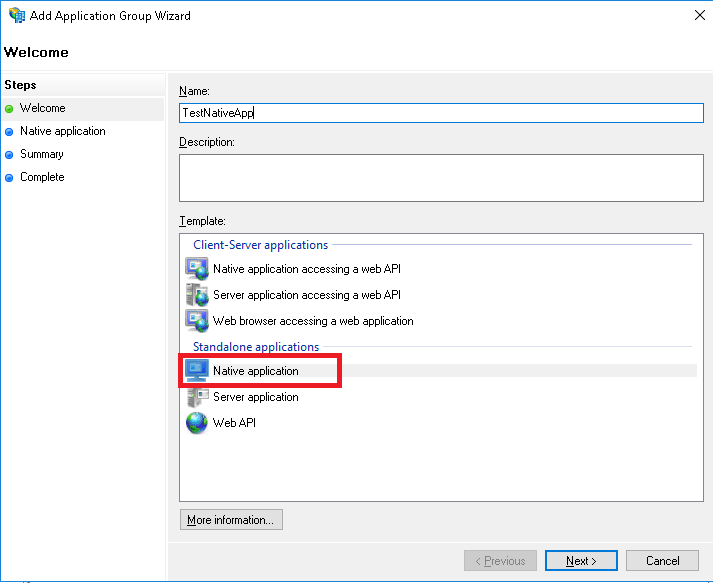
The Touch apps Server and the Touch Apps are also accessed through the Native application that was created for IFS Enterprise Explorer above. Redirect URIs must be added for the Touch Apps Server and for each individual Touch App to this same native application.
Please refer Touch Apps Server Configuration for Redirect URIs for more information
Parameter Value Identity Provider ADFS (Windows Server 2016) Identity Provider URL ADFS Service URL.
E.g: https://adfs.devsys.local/adfs/
Note: In order to find the URL to use here open a power shell in the server where ADFS is installed and type Get-ADFSProperties. HostName and HttpsPort properties are the values that should be used to construct this URL.Acceptable Clock Skew (seconds) This will be the torelated amount of clock skew when the validity of the token is calculated. E.g: 60s Client ID (web) Client Identifier taken from ADFS application registration when Aurena Web application was registered. Client Secret (web): Security Key generated when Aurena Web application was registered in ADFS Client ID (native): Client Identifier taken from ADFS application registration when IFS Enterprise Explorer and Toch apps were registered as a Native application.
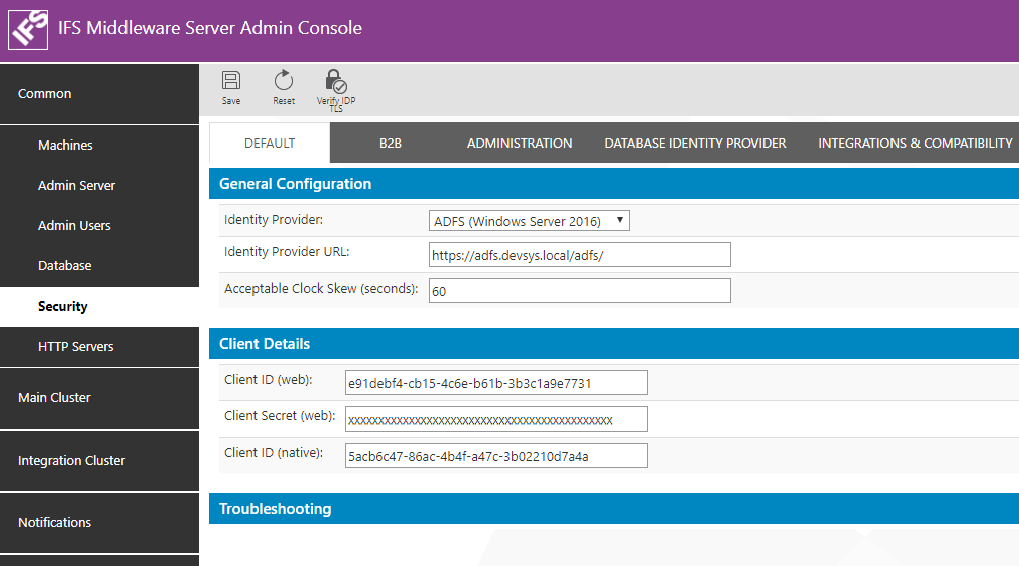
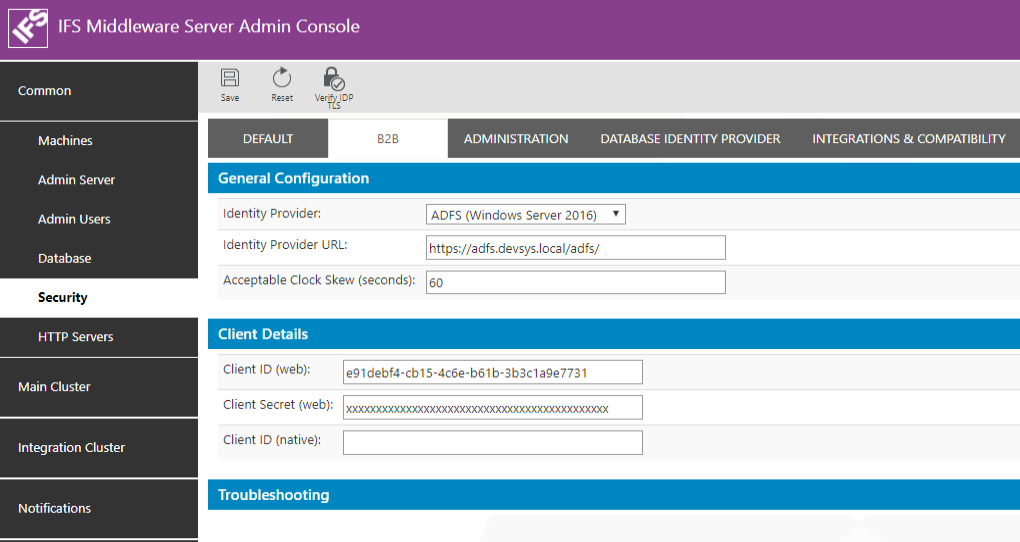
Parameter Value Identity Provider ADFS (Windows Server 2016)" Identity Provider URL ADFS Service URL.
E.g: https://adfs.devsys.local/adfs/
Note: In order to find the URL to use here open a power shell in the server where ADFS is installed and type Get-ADFSProperties. HostName and HttpsPort properties are the values that should be used to construct this URL.Acceptable Clock Skew (seconds) This will be the torelated amount of clock skew when the validity of the token is calculated. E.g: 60s Client ID (web) Client Identifier taken from ADFS application registration when B2B Web application was registered. If a seperate application was registered for B2B use that Client Identifier. Otherwise same client ID as the Aurena application must be entered. Client Secret (web): Security Key generated when B2B Web application was registered in ADFS. Use the same Client secret as Aurena if the same web application registration is used. Client ID (native): Leave this blank as there is no native application for B2B.
IFS Applications have a user registry of its own in the Oracle Database. These users are know as Foundatoin1 Users. A user authenticated from an External Identity Provider such as ADFS needs to be mapped to a Foundation1 user for him to get access (authorization) to the application. The Foundation1 users are listed in the table FND_USER_TAB. The DIRECTORY_ID field of this table is used for the mapping between the external user identity and the Foundation1 user identity.
When ADFS is used as the user repository the UserPrincipleName of the Active Directory user must be the value that should be entered as the value for DIRECTORY_ID field.
Ii is possible to use Active Directory Synchronization to map the AD users to Foundation1 users.